
Speak and Translate Languages
Battery Stats SaverCommunication
4.710.59K Reviews
- Version
- 8.1.7
- Installs
- 10.00M
- Age Rating
- Everyone
Screenshots
Our Review of Speak and Translate Languages
 Analysis by Appyee
For a translator to be useful, it has to work in the small, slightly awkward moments when neither person shares the other’s language: asking which bus to take, checking what a menu item contains, or making sure you understood a quick reply. That is the practical promise of Speak and Translate Languages. I see it as a communication app for turning spoken or typed phrases into a bridge between two people, rather than as a replacement for learning a language or having a fluent conversation.
The app is free to install and is rated for Everyone. It comes from Battery Stats Saver, and its current version is 8.1.4.2, with Android 5.0 as the minimum system requirement. Its 4.7 average from around 297,000 ratings and more than 10 million installs suggest that many people have tried it, though those figures alone cannot tell you whether its particular workflow suits you. Optional in-app purchases range from $0.99 to $99.99 per item, so I would check the purchase details in the app before committing to anything beyond basic use.
A practical routine for a first translation
My most useful approach is to keep the first exchange simple. I choose a short sentence, speak clearly, then pause long enough to let the other person read or hear the translated result. A translator can make an ordinary request easier, but it cannot repair a rushed, mumbled sentence or guess which of several meanings I intended. Breaking a complicated question into two short ones usually gives both people a better chance of following along.
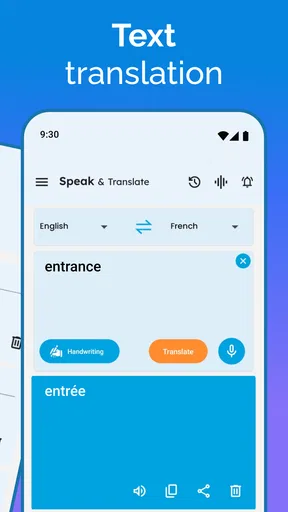
For typed translation, I treat the app like a phrase helper: enter the exact wording I want to communicate, review the result, and show it to the other person. With voice, I try to speak one thought at a time instead of narrating a whole story. This is especially helpful somewhere noisy, where even a capable speech-recognition system can struggle to separate my words from announcements, traffic, or nearby conversation.
Getting Started with Speak and Translate
First things first, installing Speak and Translate Languages was a breeze. Available on both Android and iOS, it’s super accessible. Whether you’re on a bustling city street or chilling at home, this app promises to be your go-to for instant translation needs. I easily found it on the app store, hit download, and within minutes, I was ready to roll.
The interface is quite user-friendly. You know those apps where you open them and feel instantly overwhelmed? Yeah, this isn’t one of them. It’s clean, straightforward, and even a tech newbie would feel right at home. They’ve nailed the design, keeping it intuitive without unnecessary clutter.
Features to Talk About
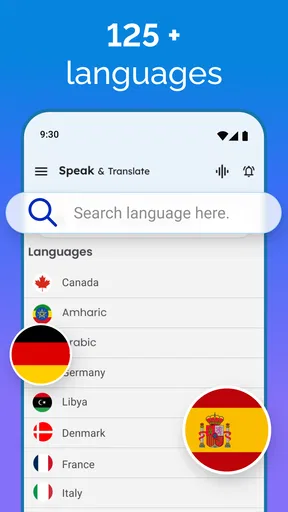
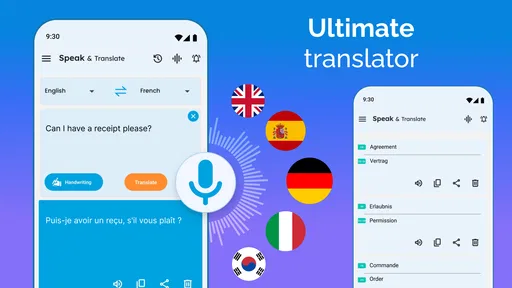
Now, let’s dig into what makes this app tick. Speak and Translate boasts a wide array of languages. We’re talking over 100 languages available for text translations and more than 50 for voice translations. Impressive, right? You can literally chat with someone across the globe, and this app will handle the heavy lifting.
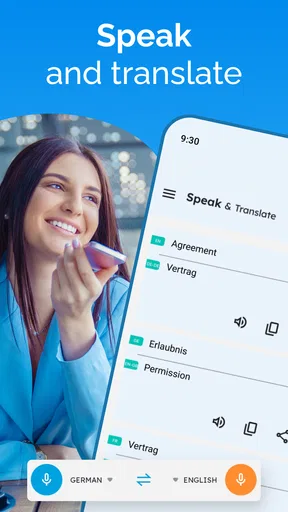
One feature I found particularly handy is the voice recognition. Just speak into your phone, and it translates in real-time. I’ve tried a few similar apps in the past, and honestly, some can be hit or miss. But here, the accuracy was pretty spot-on. Whether it’s ordering food in Paris or asking for directions in Tokyo, this feature is a game-changer.
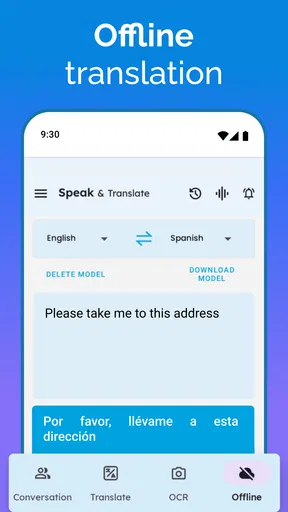
Another highlight? The offline mode. I’ve been stuck in areas with zero reception, and having the ability to translate without an internet connection is a lifesaver. Just remember to download the language packs before you disconnect!
Choosing between voice, text, and offline use
Voice is the natural choice when I need to ask a quick question without typing, but it is not automatically the best choice in every setting. If I am trying to communicate a street name, a booking reference, or an unfamiliar proper noun, typing can avoid the recognition errors that come from accents or background sound. For a sentence that matters, I prefer to check the displayed text before handing the phone over, rather than assuming the spoken result will capture every nuance.
Offline translation is most useful when I prepare before leaving reliable internet. I would select the languages I expect to need and try a basic phrase while still connected, so I know the setup is ready. That is a small habit with a real payoff: discovering a missing download at a station or border crossing is much more stressful than checking at home. Offline access is a convenience for ordinary exchanges, not a reason to rely on a phone for high-stakes instructions.
Using the App in Real Life Situations
So, how does it fare in real-world scenarios? Let’s say you’re at a café in Italy. You pull out your phone, speak into it, and voilà, your order is translated. I tested this during a recent trip, and the reactions were priceless. People were genuinely impressed, and it made interactions so much smoother.
There’s also a feature for translating conversations. Imagine sitting across from someone and having a real-time chat in two different languages. It felt futuristic, and I loved every second of it. The app lets you speak naturally, translating back and forth seamlessly.
Make a short exchange easier to follow
A realistic use is not a long, free-flowing conversation but a sequence of small decisions. At a café, I might ask whether a dish contains an ingredient, read the translated answer, and then ask a separate question about the bill. Keeping each turn focused makes it easier to notice when something has been misunderstood. I also make room for the other person to respond instead of tapping through screens too quickly; the phone should support the conversation, not dominate it.
That is where the app differs from a pocket dictionary. A dictionary is often better when I want to look up one word or study its meaning, while a translator is more convenient for forming a whole request or exchanging a response. A human interpreter is still the better choice for medical, legal, or sensitive discussions, where context and exact wording matter too much to leave to an automated translation. For everyday travel questions, though, a quick voice or text exchange can be a useful middle ground.
Settings and habits that prevent avoidable friction
I would check the selected languages before starting a conversation, especially if I have recently used the app for a different pair. It is an easy detail to overlook when someone is waiting for an answer. I also keep my phone’s volume at a level both people can hear and avoid placing it beside a speaker or directly in a gust of wind. These are ordinary adjustments, but they make voice translation less awkward without depending on any hidden shortcut.
For repeat visits to a place, I prepare a few short questions in advance by thinking through the situations I am likely to face: asking for directions, clarifying a price, or explaining a simple preference. I do not assume a saved phrase feature or a particular shortcut; the useful habit is simply knowing what I want to say before I open the translator. That reduces fumbling and helps me notice if the result sounds unlike my intention.
If the first translation looks odd, I do not keep repeating the same sentence more loudly. I rephrase it with simpler words, remove idioms, and try one clause at a time. For example, instead of asking a long question with several conditions, I separate the main request from the follow-up. This is a practical way to work around ambiguity, and it is often more effective than blaming the microphone or the app immediately.
Where a translator should not be the final authority
Translation quality depends on more than the app: language pair, pronunciation, noise, slang, and the topic all affect how well a sentence carries across. A smooth-sounding result can still miss a qualification or tone. I would use this tool to get a basic meaning across, then confirm important details by asking the person to repeat, point, or show the relevant information. That extra check matters for allergies, medication, travel changes, and payments.
There is also a social trade-off. Passing a phone back and forth can feel impersonal, and speaking into a device may not be appropriate in every interaction. For a quick practical request, most people understand the purpose; for a personal conversation, I would use the app to establish the basics and then slow down, use gestures, or find another way to make the exchange comfortable. If I need a dependable conversation for work or an important appointment, I would choose a qualified human interpreter rather than treating a consumer app as a guarantee.
Sound Quality and Performance
Now, let’s talk about performance. The sound quality during voice translations is clear and natural. No robotic tones here, which is a relief. The app processes quickly, with minimal lag, ensuring conversations flow without awkward pauses.
Battery usage is always a concern with apps that run continuously, but luckily, Speak and Translate doesn’t drain your phone like some apps do. It’s efficient, which is crucial when you’re out and about all day.
Like any app used outdoors, the experience can be affected by a phone’s microphone, speaker, network conditions, and surrounding noise. I plan a backup for times when I cannot afford a failed exchange: typing the phrase, repeating it more simply, or pointing to a written address can be more reliable than speaking over traffic. Since it is free to download but offers in-app purchases, I would also decide what I actually need before buying anything. Someone who only needs occasional basic translations may find a paid upgrade unnecessary, while a frequent user should compare the purchase terms with their normal usage.
Who will get the most from it
I think it suits travelers, people who occasionally meet visitors who speak another language, and anyone who wants help with short everyday exchanges. It can also be handy at home when reading or composing a simple message in a language I do not know well. The broad language coverage makes it worth considering when a trip involves more than one language, but voice coverage and text coverage are not identical, so I would check that the language I need is available in the mode I plan to use.
I would skip it as my main solution if I need deep language study, polished writing, or dependable interpretation for consequential decisions. A dedicated learning app is better for lessons and steady practice; a dictionary is better for examining a word carefully; and a professional interpreter is better when precision and accountability are essential. This app’s strength is convenience in the moment, not replacing those tools.
Wrapping It All Up
To sum it up, Speak and Translate Languages is more than just an app; it’s a tool that connects people. Whether you’re a frequent traveler, learning a new language, or just want to expand your communication horizons, this app is a solid choice. The ease of use, combined with the extensive language support, makes it a must-have on your phone.
So, there you have it. If you’re ready to break down language barriers and explore the world with a bit more confidence, give Speak and Translate a try. I’m glad I added it to my app arsenal, and I bet you will be too!
My verdict after weighing the trade-offs
I would recommend it as a convenient backup for ordinary communication, particularly when a short spoken or typed exchange is all that stands between me and getting something done. Its most valuable feature is not a promise of perfect fluency; it is the ability to make a first attempt easier, then let two people clarify what they mean. That framing keeps expectations realistic and helps the tool feel useful instead of magical.
My best advice is to check the language pair and offline preparation before you need them, keep requests brief, and confirm anything important in another way. If that matches the kind of help you want, the app is an approachable place to start. If accuracy has serious consequences or you want to learn a language systematically, I would choose a specialist tool instead.
Verdict
Strengths of Speak and Translate Languages
- Easy-to-use interface for quick translations.
- Supports a wide range of languages.
- Voice input enhances usability on the go.
- Offline mode available for key languages.
- Accurate translations with contextual understanding.
Limitations of Speak and Translate Languages
- Requires a stable internet for full features.
- Ads can be intrusive in free version.
- Limited offline languages available.
- Occasional lag with voice translation.
- Premium features locked behind paywall.
Other Releases by Battery Stats Saver
View All
Photo Lock App - Hide Pictures
Personalization4.6

All Deleted Messages Recovery
Communication4.2

USB Screen Share - Phone to TV
Personalization3.8

Compass app - Accurate Compass
Maps & Navigation4.2
Similar Picks in This Category
View All
Google Messages
Google LLC4.6

Gmail
Google LLC4.1

Google Meet
Google LLC4.4

Google Chrome
Google LLC4.1

WhatsApp Messenger
WhatsApp LLC4.6

Carrier Services
Google LLC4.2
Frequently Asked Questions
What languages does Speak and Translate support?
Speak and Translate supports a wide range of languages, making it an incredibly versatile tool for global communication. The app covers major languages such as English, Spanish, French, German, Chinese, Japanese, and many more. It's designed to cater to both common and lesser-known languages, offering users the ability to communicate across diverse linguistic barriers.
How accurate is the translation provided by the app?
The accuracy of translations in Speak and Translate is generally high, as it utilizes advanced algorithms and machine learning to interpret languages. However, users should note that while it excels with commonly used phrases and sentences, complex idioms or nuanced expressions may occasionally lead to less precise translations. Continuous updates aim to improve accuracy over time.
Can Speak and Translate be used offline?
Speak and Translate offers limited offline functionality. While basic translations for a select number of languages are available without an internet connection, the most accurate and comprehensive translations require online access. Users should plan accordingly if they intend to use the app in areas with limited connectivity.
Is there a cost associated with using Speak and Translate?
Speak and Translate offers both free and premium versions. The free version provides basic translation services, while the premium subscription unlocks additional features such as enhanced language packs, offline capabilities, and an ad-free experience. Pricing for the premium version varies depending on the subscription plan chosen.
What features are included in the premium version of the app?
The premium version of Speak and Translate includes a host of enhanced features designed to improve user experience. These include advanced voice recognition, expanded language support, offline translation capabilities, and an ad-free interface. Additionally, premium users often benefit from priority customer support and regular updates that introduce new functionalities.
